

 The Attack Paths page in BloodHound Enterprise surfaces . Each finding includes prioritization data such as exposure and impact metrics to help you focus remediation efforts where they matter most.
Not every finding requires immediate remediation. Risk acceptance lets you acknowledge a finding as a known risk that your organization has reviewed and chosen to retain for a certain amount of time.
Use acceptance when:
The Attack Paths page in BloodHound Enterprise surfaces . Each finding includes prioritization data such as exposure and impact metrics to help you focus remediation efforts where they matter most.
Not every finding requires immediate remediation. Risk acceptance lets you acknowledge a finding as a known risk that your organization has reviewed and chosen to retain for a certain amount of time.
Use acceptance when:
- You have reviewed the risk and agreed to tolerate it for a defined period.
- You are waiting for a change to complete, such as a retention window.
Accepting a finding records that the risk is known and temporarily tolerated. Acceptance is not a fix. To reduce risk, you must remediate the underlying condition.
- You are ready to remove the risky condition.
- You want posture trends to reflect actual risk reduction.
Accept a finding
Before accepting a finding, you must sign in to BloodHound Enterprise with a role that can accept attack path impacted principals. When you accept a finding principal:- It is still included in posture calculations.
- It is hidden from the default principal table view for that finding.
- The principal and related edges still appear in other analysis views, including Explore and Posture.
1
Open the Attack Paths page
In the left navigation menu, click Attack Paths.
2
Locate the finding
Expand the finding, open the menu to the left of the principal name (three vertical dots) and click Accept.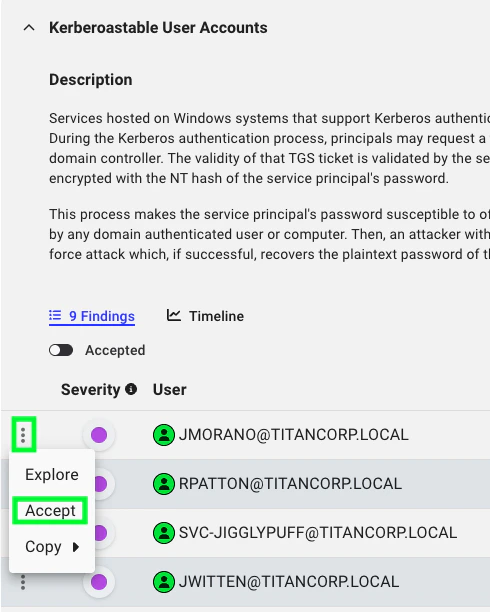
3
Set acceptance duration
In the Accept Attack Path window, set the number of days for acceptance and click Accept.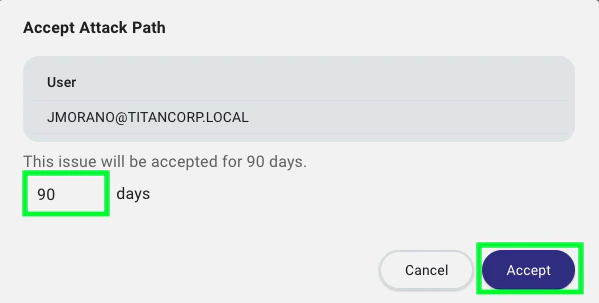
Remove acceptance
To remove acceptance for a principal:1
Open the Attack Paths page
In the left navigation menu, click Attack Paths.
2
Locate the accepted principal
Expand the finding and enable the Accepted toggle.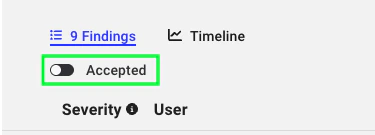
3
Remove acceptance
Open the menu to the left of the accepted principal (three vertical dots), and click Remove Acceptance.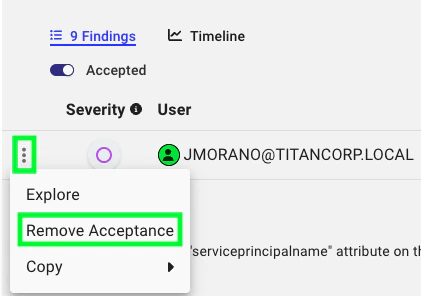
4
Confirm removal
In the Remove Attack Path Acceptance window, select Remove Acceptance.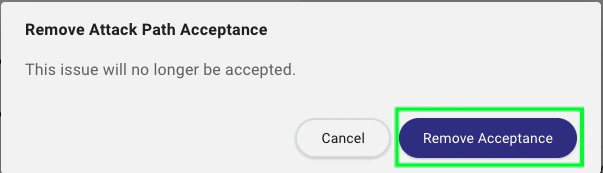
Outcome
After acceptance, the principal is hidden from the default principal table for that finding until you enable the Accepted toggle. The principal and related edges remain visible in the Explore and Posture pages.